Introduction
insperplot extends ggplot2 with Insper’s visual identity, providing custom themes, color palettes, and specialized plotting functions for academic and institutional use.
Fonts
insperplot bundles the Inter, EB Garamond, and Playfair Display font families and registers them automatically when the package is loaded — no manual setup required.
The default title font is Georgia (a system font pre-installed on most operating systems). If Georgia is unavailable, the theme falls back to the bundled serif fonts.
For the best rendering quality, install the ragg package
(install.packages("ragg")) and, if using RStudio, set the
graphics backend to AGG under Tools > Global Options >
General > Graphics.
Basic Usage: theme_insper()
The foundation of insperplot is theme_insper(), which
applies Insper’s visual identity to any ggplot2 plot. Simply add it to
any ggplot2 chart to get a clean, branded appearance with Insper’s
typography and colors.
ggplot(mtcars, aes(mpg, wt)) +
  geom_point() +
  labs(
    title = "Basic Theme",
    subtitle = "Using theme_insper()",
    caption = "Source: mtcars"
  ) +
  theme_insper()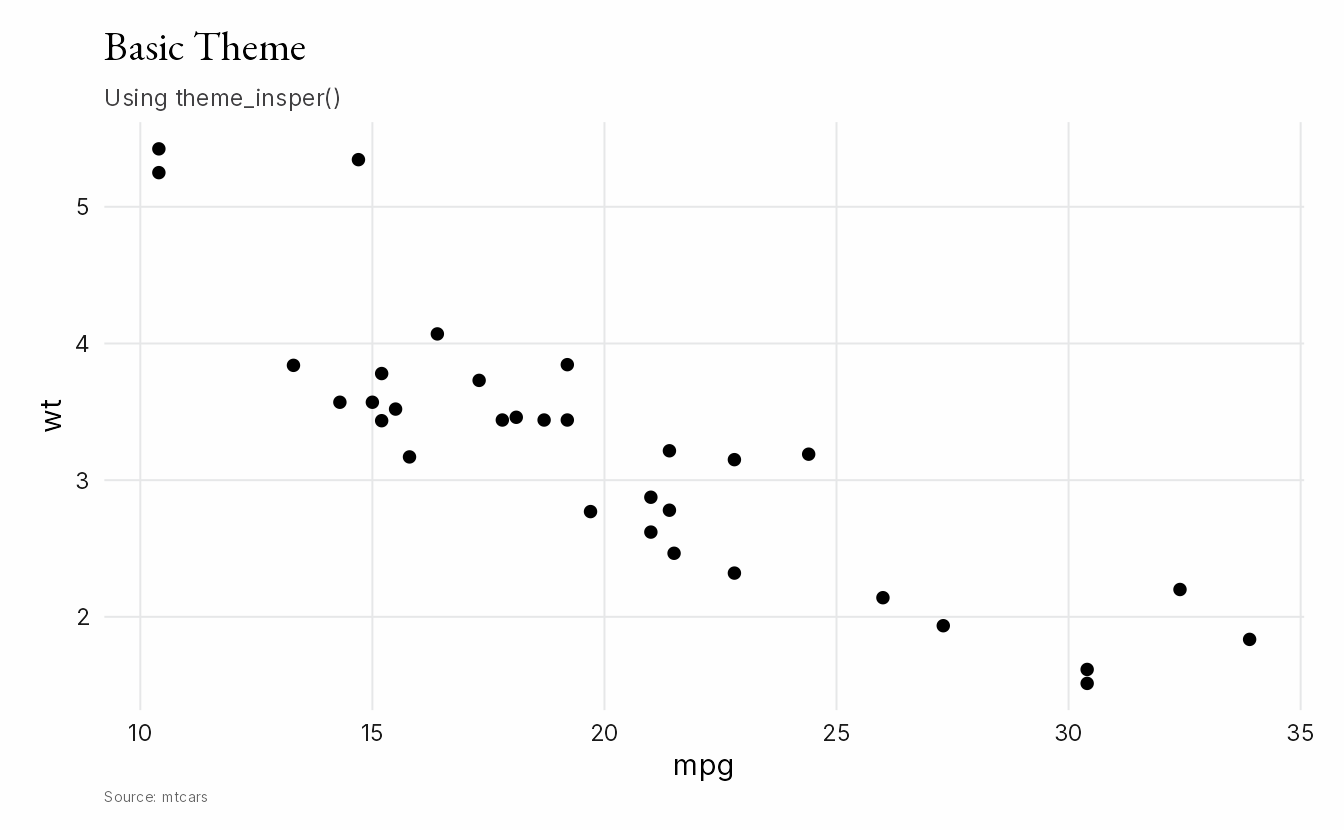
Customizing the Theme
theme_insper() supports several arguments for quick
customization:
-
font_title: Font for titles. Default is"Georgia". -
font_text: Font for body text. Default is"Inter". -
grid: Grid lines. Default isTRUE. -
border: Border style. Options are"none"(default),"half", or"closed". -
align: Title, subtitle, and caption alignment. Default is"panel".
The following examples use macro_series, a dataset
bundled with insperplot. It contains monthly Brazilian macroeconomic
indicators — including inflation (IPCA), industrial production (IPI),
and economic activity (IBC-Br) — sourced from the Brazilian Central Bank. See
?macro_series for details.
Here we plot the IBC-Br index (a monthly GDP proxy) with a
"half" border and a sans-serif title font:
ggplot(macro_series, aes(date, ibcbr_dessaz)) +
  geom_line(lwd = 0.7) +
  labs(
    title = "Economic Activity Index",
    subtitle = "IBC-Br, seasonally adjusted (base 2002 = 100)",
    x = NULL,
    y = "IBC-Br",
    caption = "Source: Banco Central do Brasil"
  ) +
  theme_insper(font_title = "Inter", border = "half")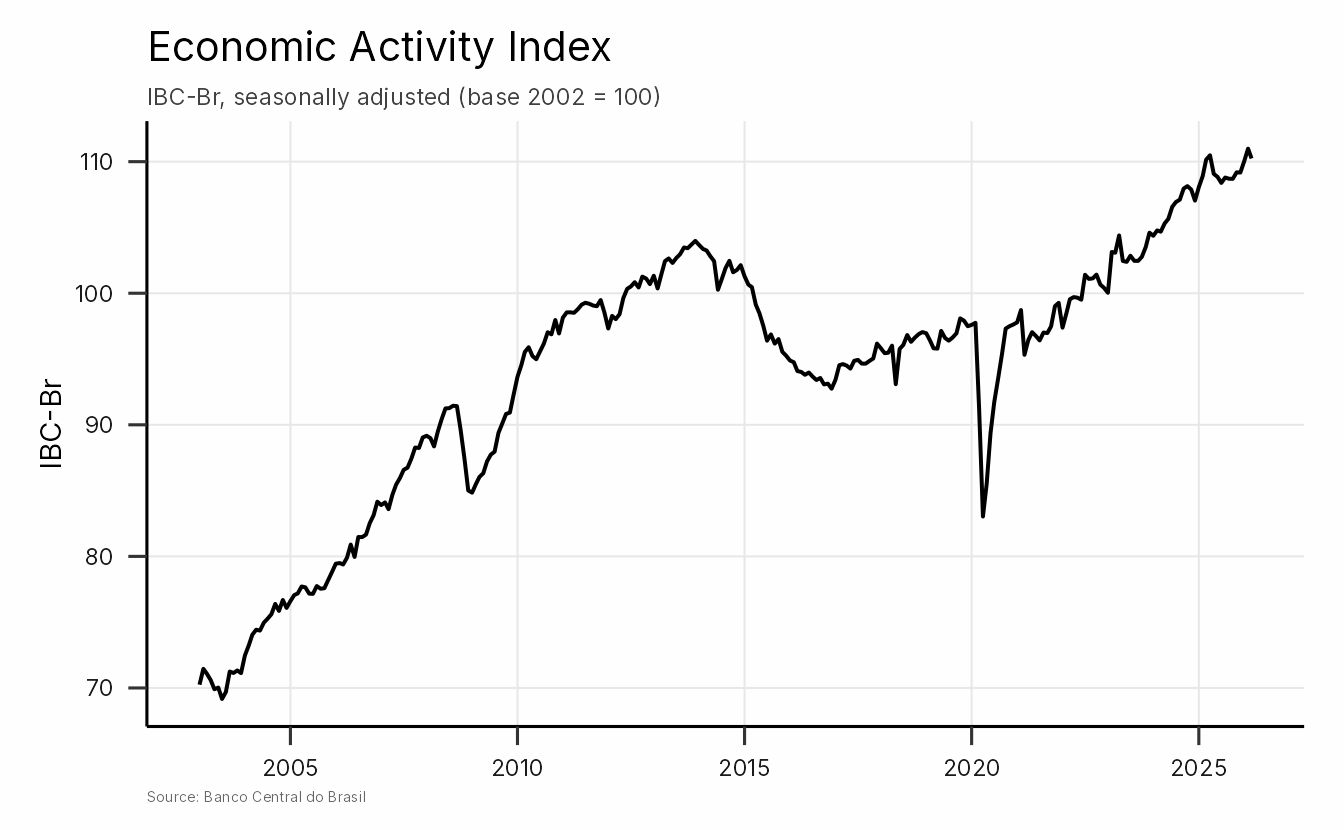
Fine-Tuning with theme_sub_*()
For more granular control, ggplot2 4.0+ provides
theme_sub_*() helper functions that target specific theme
components. Add them after theme_insper() to override
individual elements without resetting the whole theme.
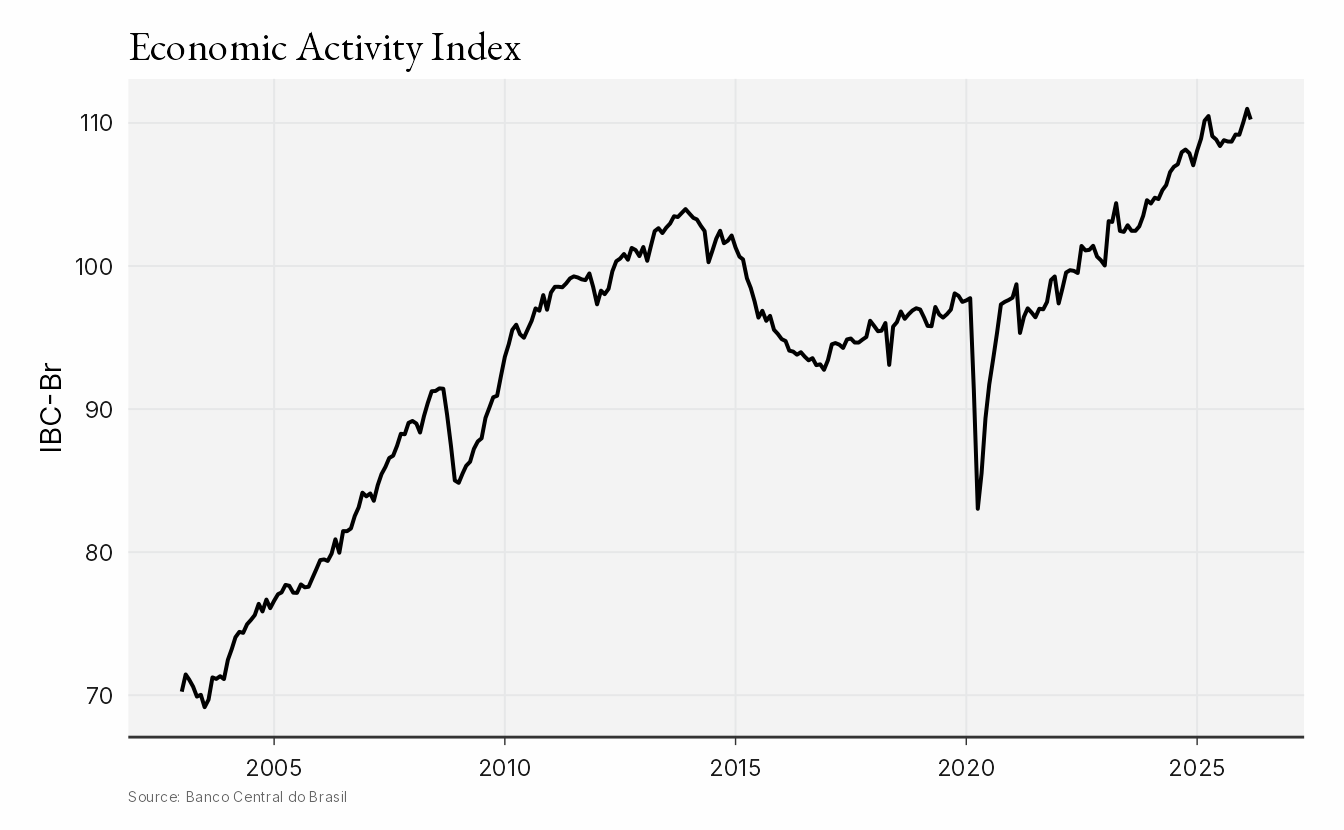
In the example below, we add axis ticks and lines to the x-axis with
theme_sub_axis_x(), and change the panel background with
theme_sub_panel():
ggplot(macro_series, aes(date, ibcbr_dessaz)) +
  geom_line(lwd = 0.7) +
  labs(
    title = "Economic Activity Index",
    x = NULL,
    y = "IBC-Br",
    caption = "Source: Banco Central do Brasil"
  ) +
  theme_insper() +
  theme_sub_axis_x(
    ticks = element_line(color = "gray20", linewidth = 0.25),
    line = element_line(color = "gray20", linewidth = 0.5)
  ) +
  theme_sub_panel(
    background = element_rect(fill = "#f3f3f3", color = NA)
  )
Working with Colors
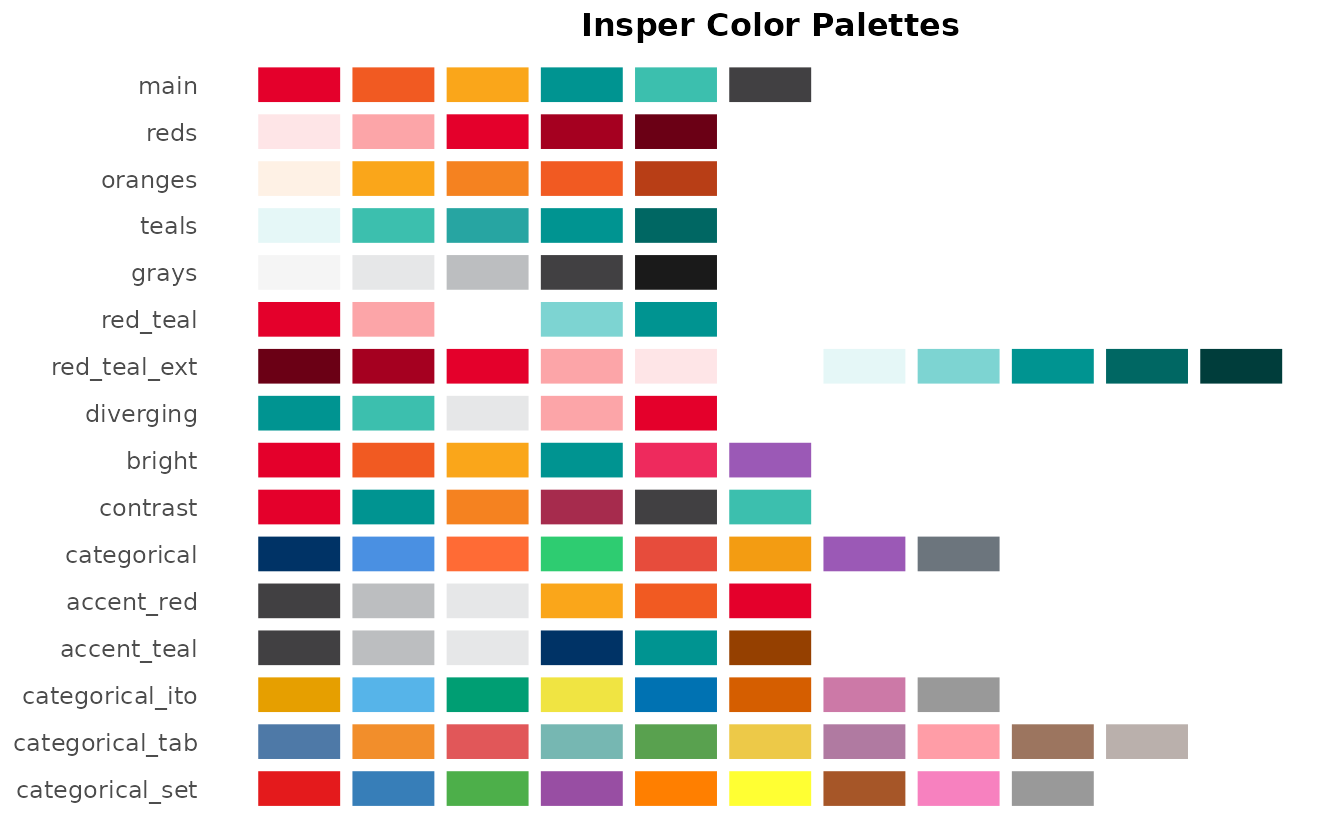
The colors used in insperplot are based on Insper’s brandkit. Use
insper_palette() to preview a specific palette and
show_insper_palettes() to see all available palettes at a
glance:
insper_palette("reds")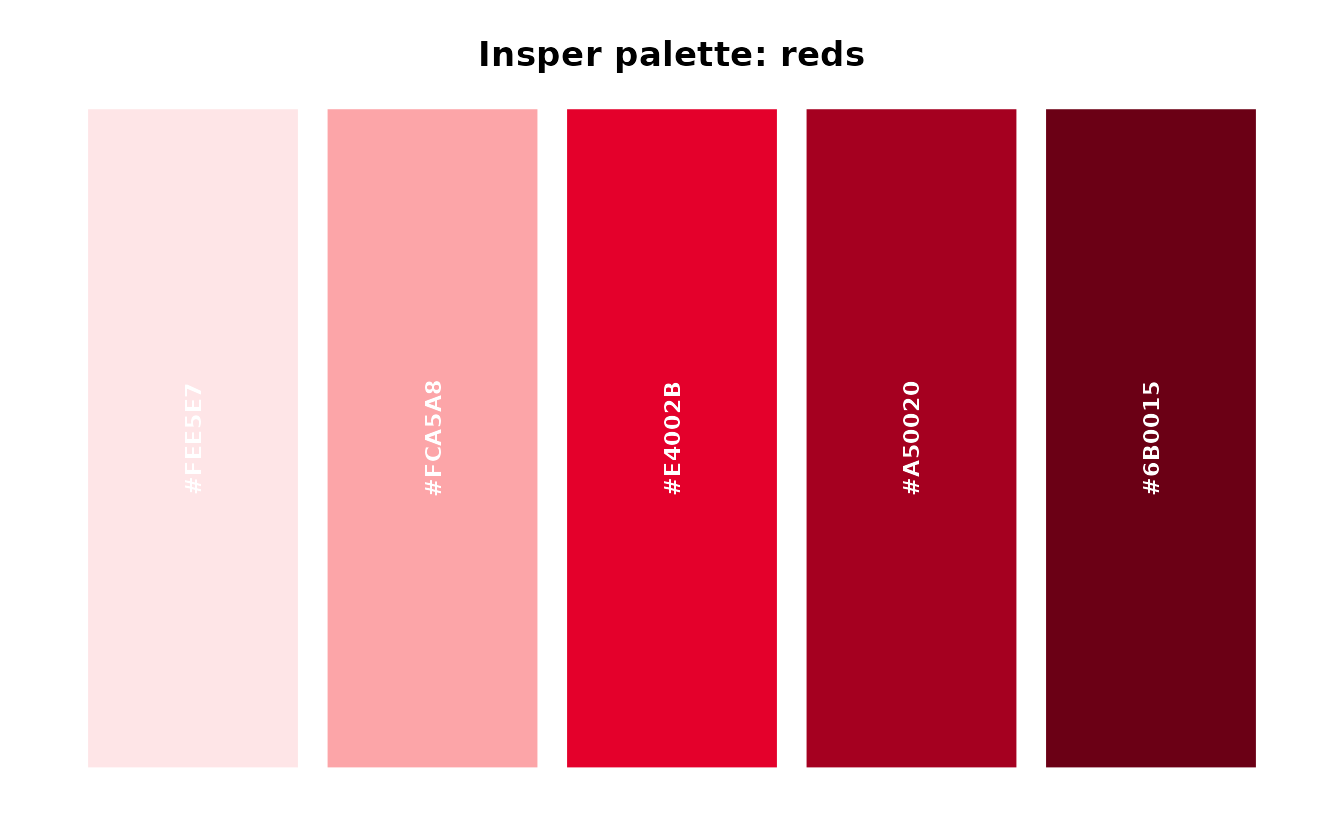
Using Colors in ggplot2
The package provides scale_color_insper_*() and
scale_fill_insper_*() functions for integrating Insper
colors into ggplot2 plots. Use the _d variants for discrete
(categorical) data and _c for continuous (numeric)
data.
Discrete Scales
For categorical variables, use scale_color_insper_d() or
scale_fill_insper_d().
The examples below use fossil_fuel, a dataset bundled
with insperplot. It tracks global primary energy consumption (in TWh) by
fuel type (coal, oil, and gas) from 1800 to the present, sourced from Our
World in Data. See ?fossil_fuel for details.
First, a stacked area chart of consumption since 1960 using
scale_fill_insper_d():
recent_fuel <- subset(fossil_fuel, year >= 1960)

ggplot(recent_fuel, aes(year, consumption, fill = fuel)) +
  geom_area() +
  scale_fill_insper_d(palette = "bright") +
  scale_x_continuous(expand = expansion(mult = c(0))) +
  scale_y_continuous(expand = expansion(mult = c(0, 0.05))) +
  theme_insper(border = "half")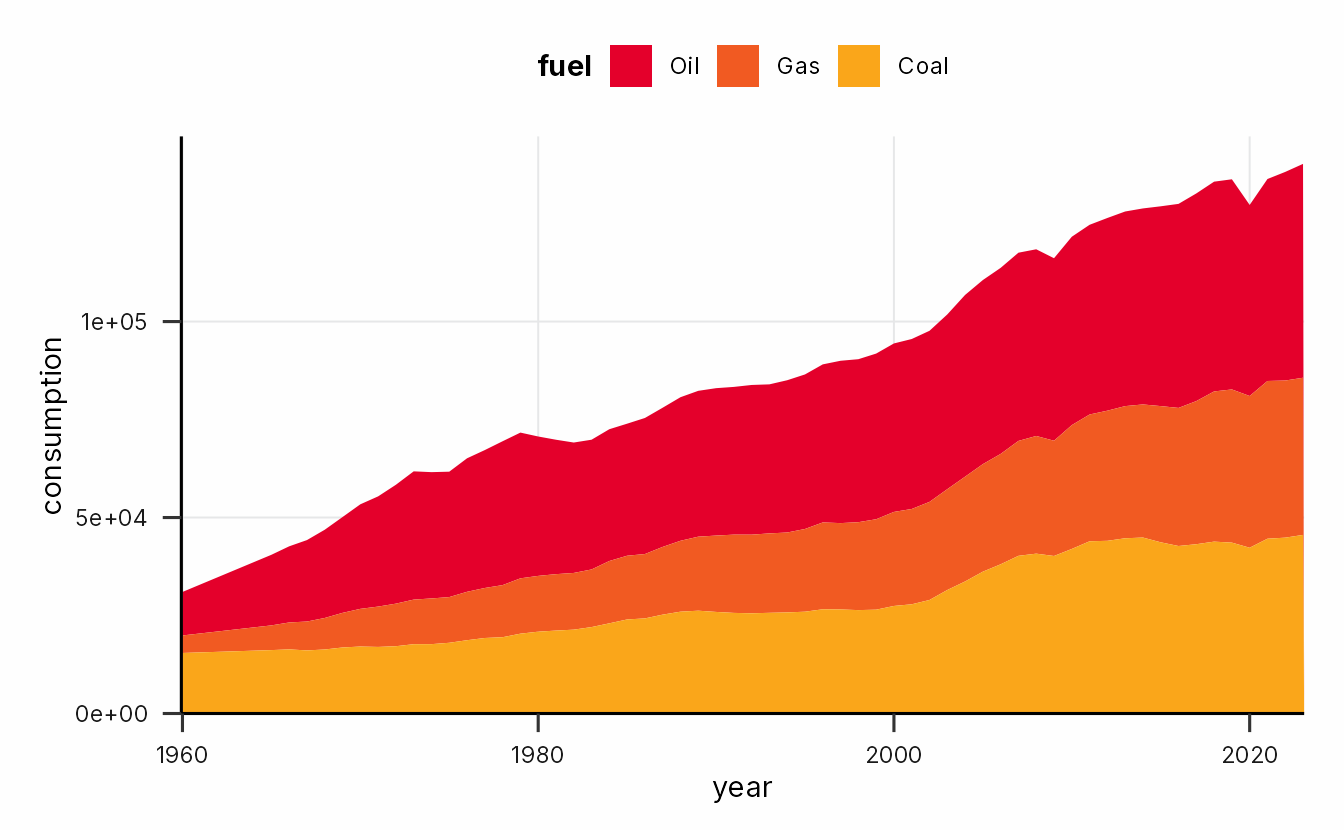
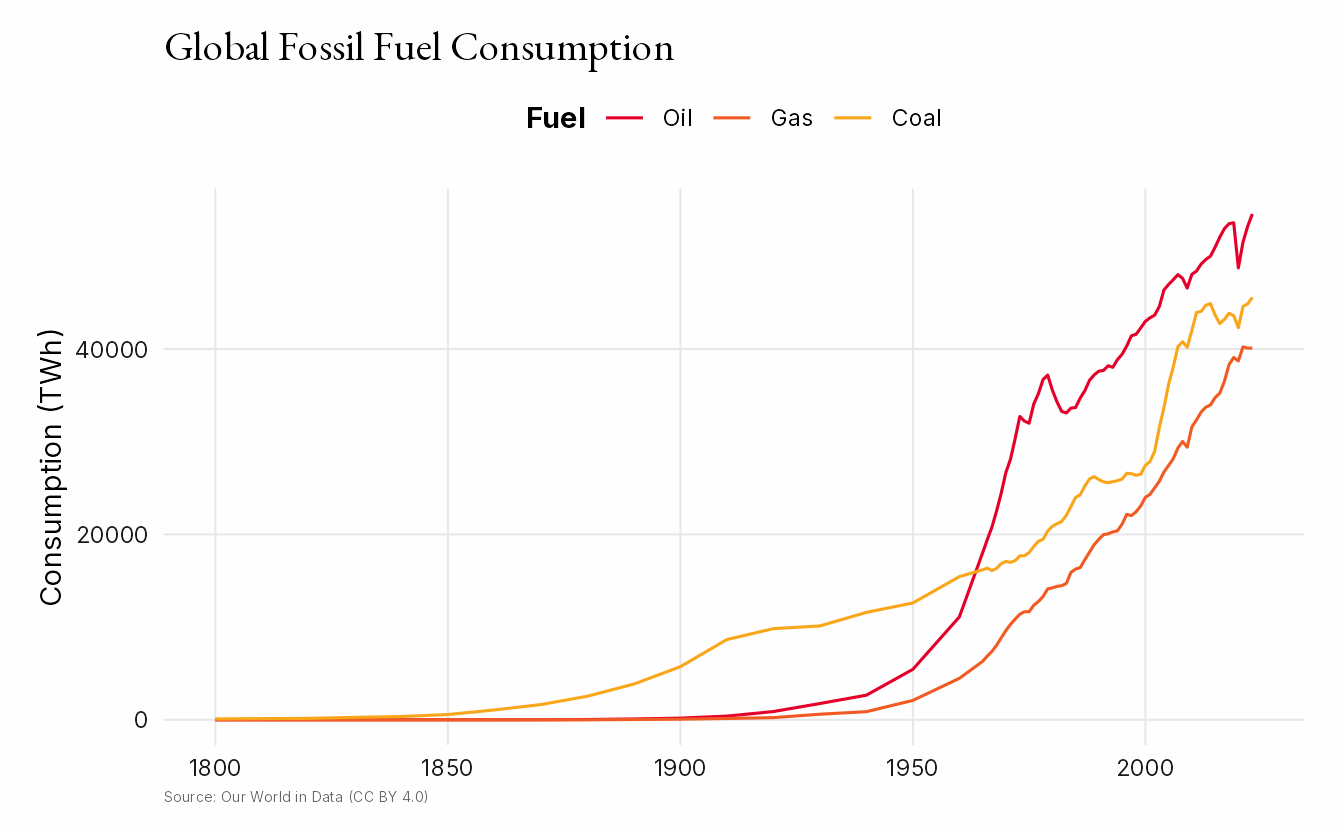
The same data shown as a line chart with
scale_color_insper_d():
ggplot(fossil_fuel, aes(year, consumption, color = fuel)) +
  geom_line() +
  scale_color_insper_d(palette = "bright") +
  theme_insper() +
  labs(
    title = "Global Fossil Fuel Consumption",
    x = NULL,
    y = "Consumption (TWh)",
    color = "Fuel",
    caption = "Source: Our World in Data (CC BY 4.0)"
  )
Continuous Scales
For numeric variables, use scale_color_insper_c() or
scale_fill_insper_c(). These create smooth color gradients
from any Insper palette.
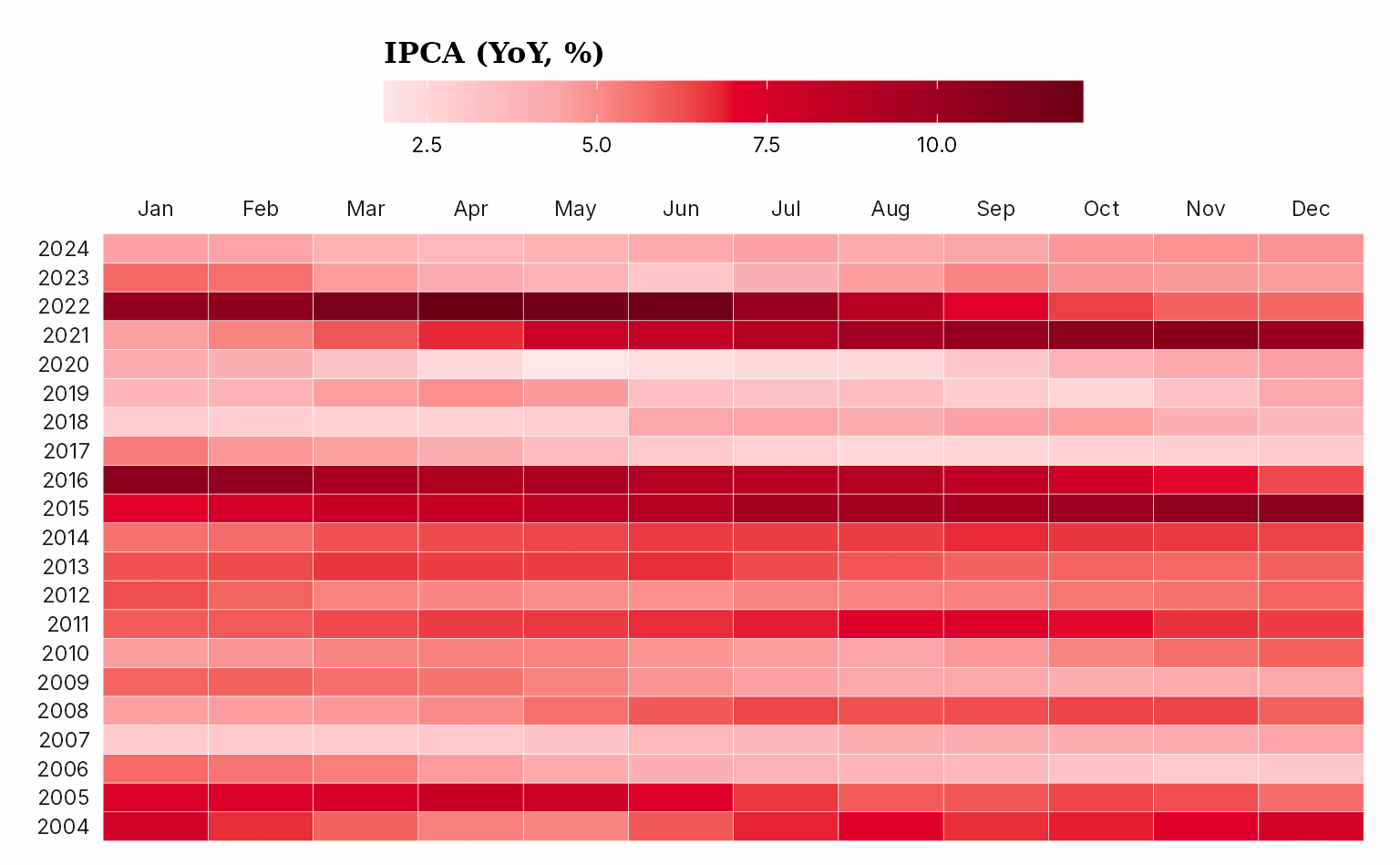
The heatmap below shows 12-month rolling inflation (IPCA) across
years and months using the "reds" palette. We compute the
rolling product from the macro_series dataset using
lubridate (for date parts) and RcppRoll (for
the rolling window):
macro_calendar <- macro_series |>
  mutate(
    year = lubridate::year(date),
    month = lubridate::month(date),
    ipca12m = RcppRoll::roll_prodr(1 + ipca / 100, n = 12) - 1,
    ipca12m = ipca12m * 100
  ) |>
  filter(between(year, 2004, 2024))

ggplot(macro_calendar, aes(month, year, fill = ipca12m)) +
  geom_tile(color = "white", lwd = 0.1) +
  scale_x_continuous(
    breaks = 1:12,
    labels = month.abb,
    position = "top",
    expand = expansion(c(0))
  ) +
  scale_y_continuous(breaks = 2004:2024, expand = expansion(c(0))) +
  scale_fill_insper_c(
    name = "IPCA (YoY, %)",
    palette = "reds"
  ) +
  labs(x = NULL, y = NULL) +
  theme_insper() +
  theme_sub_legend(
    title = element_text(family = "Georgia", size = 12),
    title.position = "top",
    key.width = unit(4, "lines"),
    position = "top"
  )
Convenience Plot Functions
Beyond the theme and scales, insperplot provides high-level plotting
functions that combine common geom + scale + theme patterns into a
single call. Each function returns a standard ggplot object, so you can
still add layers, labs, or further customization with
+.
Time Series
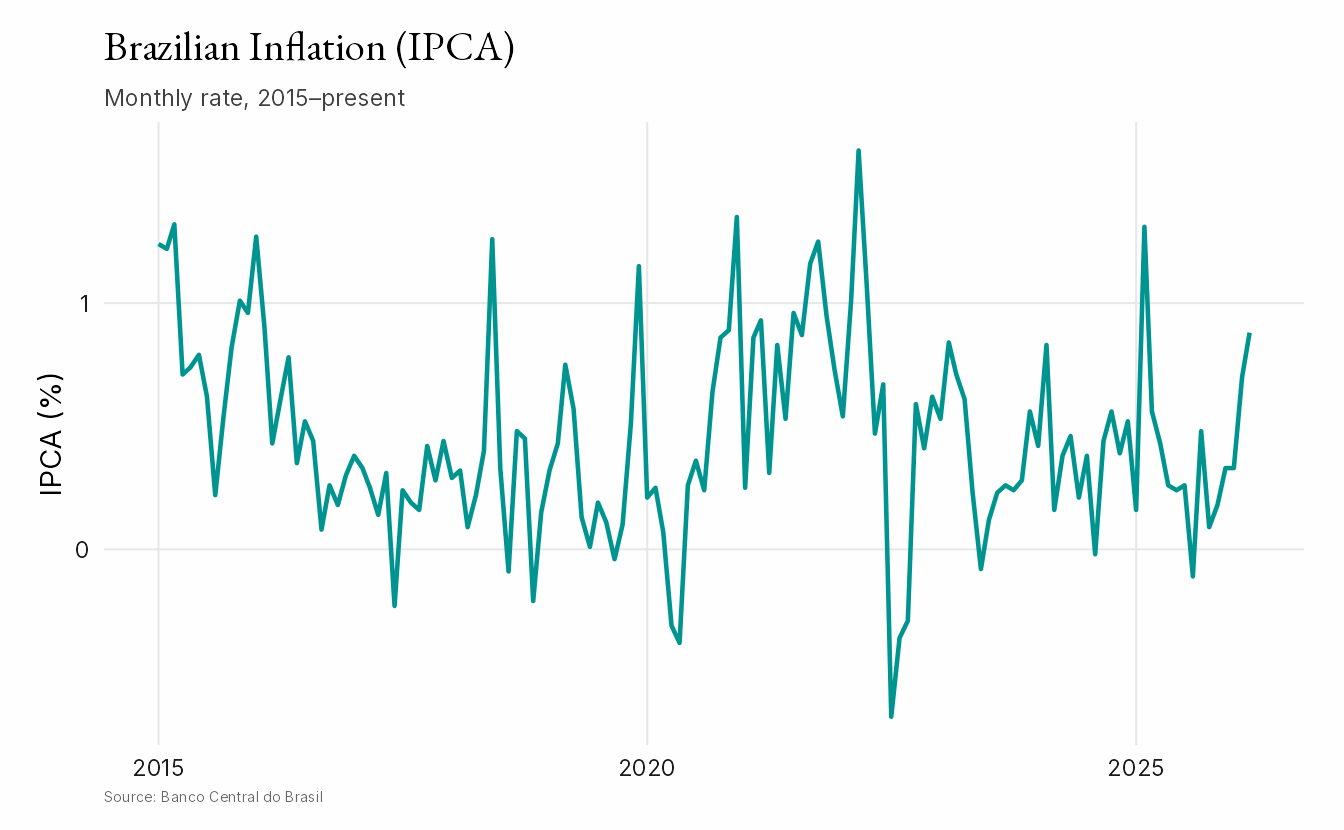
insper_timeseries() creates line plots optimized for
temporal data. It handles Date and POSIXct
axes automatically and supports multiple series via the
color argument.
recent_macro <- subset(macro_series, date >= as.Date("2015-01-01"))

insper_timeseries(recent_macro, x = date, y = ipca) +
  labs(
    title = "Brazilian Inflation (IPCA)",
    subtitle = "Monthly rate, 2015–present",
    x = NULL,
    y = "IPCA (%)",
    caption = "Source: Banco Central do Brasil"
  )
Saving Plots
For best results when saving plots, use ggsave() with
the ragg device to ensure proper
font rendering:
p <- ggplot(mtcars, aes(wt, mpg)) +
  geom_point() +
  theme_insper()

ggsave(
  "my_plot.png",
  p,
  width = 8,
  height = 5,
  dpi = 300,
  device = ragg::agg_png
)
Alternatively, save_insper_plot() wraps
ggsave() with sensible defaults for Insper-branded output:
dimensions in centimeters, a golden-ratio aspect ratio, and automatic
ragg device selection for PNG files when the package is installed.
save_insper_plot(p, "my_plot.png")

# Custom dimensions (in cm by default)
save_insper_plot(p, "my_plot.png", width = 16, height = 10)
Available Functions
In addition to insper_timeseries() shown above,
insperplot includes convenience functions for other common chart
types:
| Function | Chart type |
|---|---|
insper_timeseries() |
Line plots for temporal data |
insper_barplot() |
Vertical and horizontal bar charts |
insper_scatterplot() |
Scatter plots |
insper_area() |
Area charts |
insper_boxplot() |
Box plots |
insper_violin() |
Violin plots |
insper_histogram() |
Histograms |
insper_density() |
Density plots |
insper_heatmap() |
Heatmaps |
All functions return ggplot objects, apply
theme_insper() by default, and accept a
palette argument for Insper color palettes. See their help
pages (e.g. ?insper_barplot) for full documentation.
Learn More
- Package website — full function reference and additional articles
- GitHub repository — source code, issues, and contributing
- Insper brand colors — the color system this package is built on